




Which LLM to use for data extraction?
The quick answer in this case was OpenAI after we compared Mistral, OpenAI and Gemini, but the longer answer is a bit of a “it depends” and a “you don’t have to stick to one model”. What we did in this case to find out is measure the results with n8n evaluations.
The Client Question
Our client asked us “which AI model is best for my document data extraction automation project? We had good results with Google gemini”. Also Anthropic was mentioned as option. Since we didn’t want to rely on our gut and go by the “trust me bro” stats, we needed to deliver numbers, comparable numbers. Because what does the client want when choosing a model?
- cheapest
- fastest
- most accurate
Where most accurate would be the most Imporant part. There’s no point in having cheap and fast but wrong extractions. You can also only choose two, you can’t have all three!
just pick OpenAI?
Well, it depends. Every task has different requirements and you need to measure and test it. Your vibes about the result don’t scale and prove nothing. Want to detect if a picture is handwritten text? Don’t use Mistral OCR for that as it will will just extract the text, here Gemini would be a good choice. Want to extract OCR in a structured format? Gemini might be tricky use Mistral for this. It’s the usual boring answer “it depends”.
OpenAI vs Gemini vs Mistral data extraction
Usually when it comes to converting Images or PDF to text a lot of people miss out on Mistral. The OCR capabilities and speed from Mistral are unmatched so far, no prompt, no complicated setup. Just feed it a PDF or an Image and you get text back in a very impressive speed. For this we didn’t bother to create any measurements, I know, the post said “we measured it”, we’re getting there, I promise. However, when it comes to extracting data, here the setup was by using n8n Evaluations, creating some test data with expected results and then running the workflow through evaluations.
What we built: the evaluation system
The evaluation system isn’t that hard to build, you get a bunch of test data, save the OCR to a datatable as well as the expected result. If the result is a more complex json, you could use AI as a judge to decide the correctness, we however prefer a more deterministic way by doing a string similarity. This compares your expected output, to whatever the LLM has generated. There are a few gotchas to pay attention to, more on this in the next section.
How we score accuracy
Let’s assume you are extracting data from receipts that are accounting relevant.
- Assert on what matters, ignore cosmetic drift (compare the accounting/data fields, not wording or key order).
- Normalize before comparing (sorted keys / deep-equal, not raw string match).
- Separate “extract” from “compute”: let the model only transcribe what’s printed; do deterministic math in code. This is the single biggest accuracy + stability lesson, kills run-to-run drift. don’t ask the model to do what deterministic code does better.
- Regenerate baselines after any change; read the diff direction (not every change is a regression)
Ok this is a bit to dig into.
Assert on what matters
Not every text from the receipt needs to be perfect. The Receipt Number from a car fueling won’t be that important, the amount of fuel and the cost however is important. You need to strip away this data when you are comparing your results as well as in the baseline data.
Normalize before comparing
Comparing a JSON string can work, if the model keeps the structure and sorting always the same way. This is where the n8n structured data parser shines but it’s also dependent on the model. Some keep the key sorting, some deviate which might create issues when comparing on a string level.
Separate “extract” from “compute”
DO NOT LET THE LLM DO MATH, even if you give it a calculator tool, there’s no point in doing that. All the required data MUST be on the receipt, if it’s not there, then the receipt might be an issue. There are cases where calculations are required. Some receipts have VAT included prices, some VAT excluded prices. To normalize this, use a code node that will generate the missing data. The AI should extract what is there and if there is something to be calculated, do it with code. Another important thing to do in the compute part, check if everything adds up. Sometimes the OCR might read wrong numbers, if everything does not add up (line items + vat = total), then something is wrong and a human needs to check it.
Regenerate baselines after any change; read the diff direction
This is the tough and time consuming part. Checking the results on every run, verifying the differences, regenerating the baseline for the evaluations. This is a step yo HAVE TO do manually, passing this off to an LLM really will come and bite you later. Another tip is to have an AI in the evaluations verifying the differences and logging them. This can show you at a glance what differs and what needs to be fixed. Another Tip: n8n rounds the eval results, so if you have a 0.99 … it will show up as 100% but there still is a difference somewhere, so logging these diffs to a datatable helps you spot these real quick.
How does the eval run
The evaluation run is pretty straight forward:
- read test data from datatables
- send the OCR through the LLM
- run through the compute node
- strip away data we don’t need for the evaluation (this happens in the evaluation branch only!)
- compare the results
- Log any differences if it’s not a perfect match.
Head-to-head results - the payoff
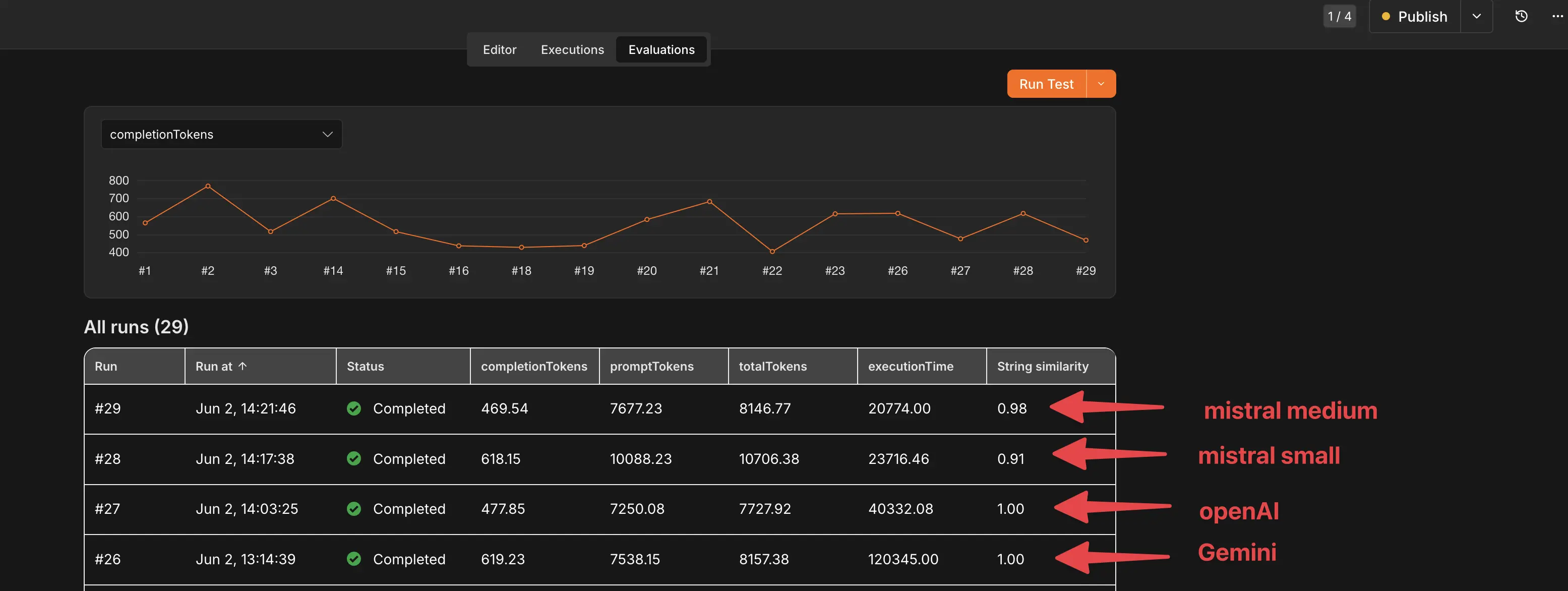
As you can see in this evaluation results, Gemini and OpenAI both deliver a perfect score, but the execution time with gemini is insane compared to OpenAI. Admittedly, not every gemini run took that long but I just want to mention it. Mistral however didn’t perform that great. There would have been room for improvements in the prompt, the JSON schema and getting the LLM to do a better job, but given the current results and simplicity of using OpenAI as the model it was pretty clear which model to use. So, this would then answer the Question of which model to use? Right? Yes, here our pick was OpenAI as main model and Gemini as Backup model, but it still is a bit tricky, I will get into a few points later.
The payoff
Here’s the real payoff of having these evaluations. During multiple tests we found a bug in the code node, no biggie, was quickly fixed. But, what does this mean now? How are the other receipts impacted with this change? And this is the awesomeness of n8n evaluations! You start them and have feedback on what your workflow is doing after any change.
Just look at these awesome results:
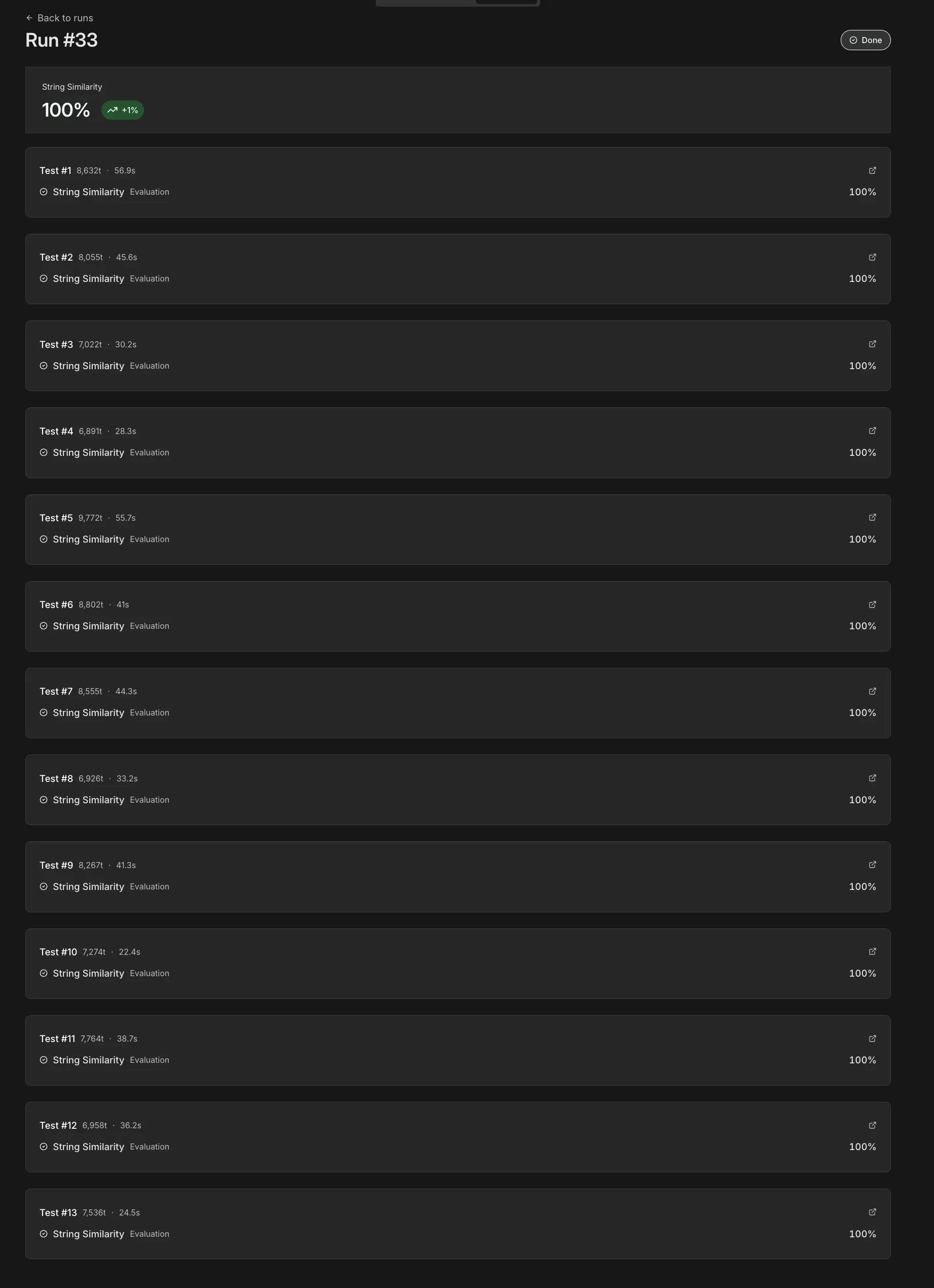
Doesn’t this give you peace of mind?
Why not gemini?
We use JSON schema and not JSON examples when extracting data. JSON examples are a suggestion which the LLM can override, JSON schemas will trigger an error if the extracted data does not validate against the Schema. That being said, gemini has a different approach then OpenAI, Mistral or Anthropic. The Schema refuses default values and other small oddities which makes it a bit tricky to work with. While this still can use gamini for the extraction part and using another model for the orchestrator that also assembles the JSON schema, but looking at the run times, OpenAI seems the better choice in this case.
Your takeaway: evals are a regression test
- You updated anything in the prompt? How do you know everything still works? -> Run the evaluations
- You updated code or the workflow? How do you know everything still works? -> Run the evaluations
I think you get the idea.
FAQ
How do you measure LLM accuracy for data extraction?
It depends on the case, usually with string similarity, even though I suggested to try to stick to something else. It’s the simples approach and if the model sticks to the JSON structure, string similarity works great.
What is an LLM eval / evaluation set?
You need some test data and an expected result that you can then compare. Datatable is ideal for this, it’s quick, built in and easy to work with. Something as simple as this.
| OCR | expected_result | actual_result |
|---|---|---|
| xxx | { … } | null |
| Once your evals run, you fill the actual_result and have the eval check node evaluate the result. |
How much does model choice change cost?
A lot! While n8n won’t show you the cost of each model, it does show you the amount of tokens used during the test. If you then take your LLM Provider of choice and look at their pricing, you can easily understand which one is cheaper and which one more expensive.
Where to go from here?
We build reliable extraction workflows and test data to measure and test them. Need help? You can Contact us or book a short video call.
Photo by Sophia Kunkel on Unsplash